 Translate
GDPR Compliance Statement for Koolmesh
1. Introduction
Koolmesh (KOOLMESH TECHNOLOGY UK LTD)is committed to ensuring compliance with the European Union’s General Data Protection Regulation (GDPR) (Regulation (EU) 2016/679). This document outlines how our wireless lighting control systems and related services collect, process, and protect personal data in accordance with GDPR requirements.
2. Scope
This statement applies to:
● All Koolmesh wireless lighting control hardware, software, and cloud-based services.
● Customers, partners, and end-users within the European Economic Area (EEA).
3. Data Processing Overview
3.1 Types of Data Processed
Koolmesh systems may process the following categories of data:
● Technical Data: IP addresses, device identifiers (e.g., MAC addresses), network metadata.
● User Data: Account credentials, user preferences (e.g., lighting schedules), and audit logs.
● Operational Data: Device status, energy usage metrics, and system diagnostics.
Note: Koolmesh does not intentionally process "special categories" of personal data (e.g., biometrics,) under GDPR Article 9.
3.2 Purpose of Processing
Data is processed to:
● Deliver and optimize wireless lighting control functionality.
● Provide customer support and system maintenance.
● Fulfill contractual obligations and improve product performance.
4. Legal Basis for Processing
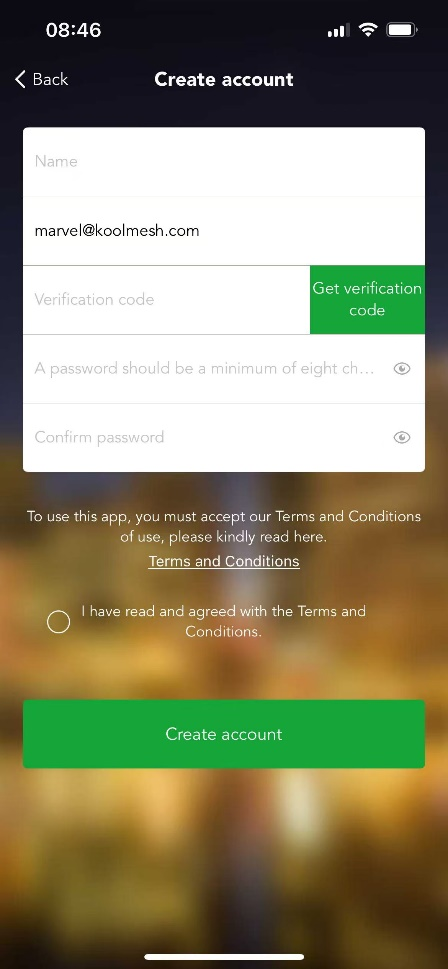
We rely on the following GDPR Article 6 legal bases: refer to Figure 4.0
● Contractual Necessity: To fulfill agreements with customers.
● Legitimate Interests: For system security, fraud prevention, and service improvements.
● Consent: Where required (e.g., optional analytics), explicit consent is obtained and documented.
5. Data Subject Rights
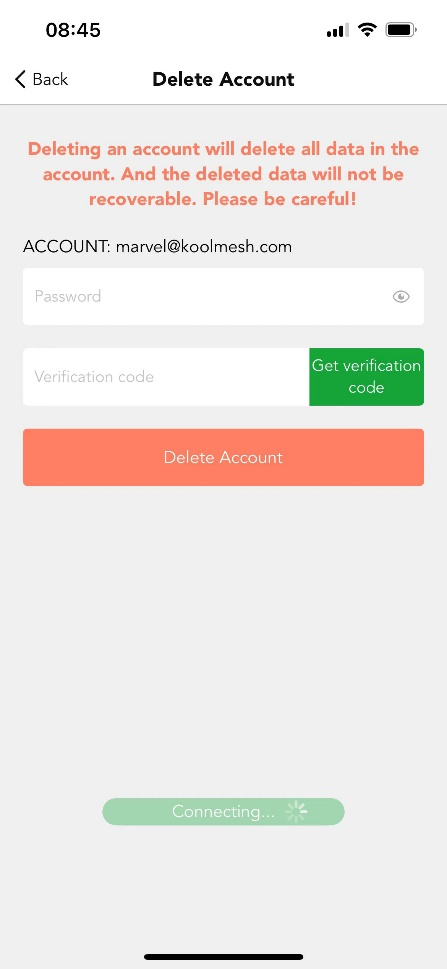
We uphold data subject rights under GDPR, including: refer to Figure 5.0
●Right to Access: Users may request a copy of their processed data.
●Right to Rectification: Correction of inaccurate data.
●Right to Erasure: Deletion of data where legally permissible.
6. Data Security Measures
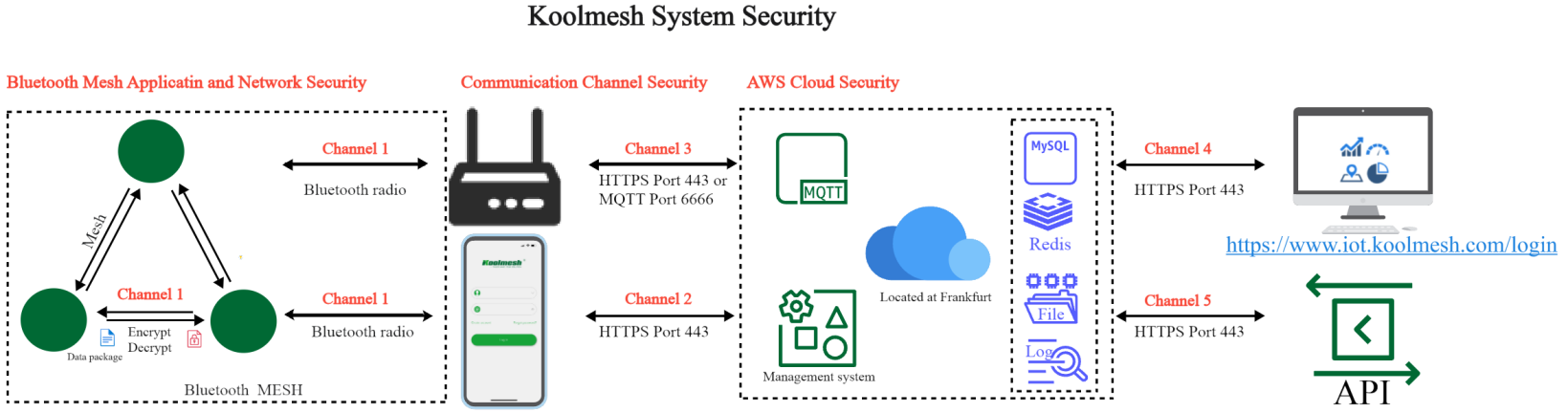
There are three levels of security in Koolmesh system, they are Bluetooth MESH Application and Network Security, Communication Channel Security, AWS Cloud Security.
6.1 Bluetooth MESH Application and Network Security
6.1.1 Bluetooth Mesh Protocol
Encrypting and authenticating messages at the upper transport layer and network layer is designed to secure communications within the mesh network against eavesdroppers and malicious attacks. Each layer maintains distinct keys to allow separation between application and network entities.
All messages are encrypted and authenticated using two types of keys. One key type is for the network layer communication, such that all communication within a mesh network would use the same network key. The other key type is for application data. Separating the keys for networking and applications allows sensitive access messages (e.g., for access control to a building) to be separated from non-sensitive access messages (e.g., for lighting). There are no unencrypted or unauthenticated messages within a mesh network.
The BLE SIG 5.0 Standard covers requirements for this, including:
● Encryption and Authentication
All Bluetooth mesh messages are encrypted and authenticated
● Separation of Concerns
Network security, application security, and device security are addressed independently
● Area Isolation
A Bluetooth mesh network can be divided into subnets, each cryptographically distinct and secure from the others
● Key Refresh
Security keys can be changed during the life of the Bluetooth mesh network via a Key Refresh procedure
● Message Obfuscation
Message obfuscation makes it difficult to track messages sent within the network and, as such, provides a privacy mechanism to make it difficult to track nodes
● Replay Attack Protection
Bluetooth mesh security protects the network against replay attacks
● Trashcan Attack Protection
Nodes can be removed from the network securely, in a way which prevents trashcan attacks
● Secure Device Provisioning
The process by which devices are added to the Bluetooth mesh network to become nodes is a secure process
More details please refer attached link https://www.bluetooth.com/blog/bluetooth-mesh-security-overview/
Or refer to Mesh Profile / Specification Revision: v1.0.1 2.3.9 Security
6.1.2 Over the Air (OTA) update
The Koolmesh system is fully compliant with the BLE 5.0 standard in the Bluetooth layer. The BLE 5.0 Standard ensures continual monitoring of potential security threats. Therefore if a potential threat is detected against the current BLE 5.0 protocol, the protocol will be updated, and Hytronik / Koolmesh will follow this, and update our protocol immediately. If required, an applicable update can be implemented to an existing network system, via an “Over the Air” (OTA) upgrade by the manager for the site network. All OTA updates for the firmware are protected by the Koolmesh protocol, and only the Koolmesh App or Koolmesh enabled gateway can gain access to the Koolmesh firmware server to request an update. All firmware is encrypted on both the application side and network side. Every time the user requests a update via the App, it will send the user’s token and sign to the server to authorize access. When the authorization is approved, the server will send out the encrypted updates through the internet to the App. The App will again check the sign and token, before decrypting the update and installing it on the device.
6.1.3 Account ownership, Project, Network, Permission Management and Authorization Levels of installation:
In the Koolmesh system, there are three account identities or “levels” for a single mesh network:
•Installer;
•Admin;
•Sub-user;
Admin:
This identity level has full access to the network, including ability to add or delete installers to the network; add or delete sub-users; and give the sub-users different layer permissions of network functions. One mesh project /network will only have one Admin level account but can have many installers or sub-users. If the Admin does not want to manage the project /network anymore, they can transfer the ownership to another user by creating a unique QR code (with encrypted key as previously mentioned). Then the project / network will disappear from the Admin’s account when transferred. Admin can manage the sub-user’s permission levels e.g. Only open control access to the sub-user, but do not allow them to change sensor’s commissioned settings or scene setting. These permissions can be set in the Koolmesh App PERMISSION SETTINGS when clicking “Add sub user”.
Installer:
This identity level is intended to commission the network, so has full access to the network, and manages the network, which includes adding or removing nodes from the network; changing mesh settings or single devices settings and conducting OTA upgrades (usually conducted during commissioning phase). If the Installer that has created the mesh network does not transfer the network to any other Admin level user, this Installer can add a new Installer to this network. The installer can also add sub user, which has the same process as for Admin.
When the Installer adds a new installer account to this network, the App will generate a QR code and an encrypted, randomized key (remains open and valid for 24 hour). So the new installer can use the Koolmesh App to scan this QR code or key in the encrypted randomized key to get access to the same network. All the authorization process is done within the Koolmesh App.
After the installer has finished the commissioning on site, they can “transfer” the ownership of the network to the Admin account, there is “transfer” available. They will need to enter their account password generating a QR code and complete this process. After the “ownership transfer” is completed, this network will disappear from the installer’s account, and will appear on the Admin’s account instead.
Sub-User:
Managed by the Admin/installer level user, the Sub User identity / level does not usually have the full access and permissions to the network. This level cannot transfer or add Installers. Again, this identity can be authorized by the Admin/installer level to have different layer permissions e.g. only permit on/off control of the luminaires.
All the authorization processes are protected by the Koolmesh protocol, and all the encryption keys are generated randomly, and are unrepeated (as detailed above). All the account data are encrypted and saved, with backup on the cloud servers.
6.2 Communication Channel Security
There are among several communication channels though out Koolmesh system, including
Channel 1 Node and Node, node and mobile phone or gateway
Channel 2 Mobile phone and Cloud
Channel 3 Gateway and Cloud
Channel 4 Cloud and Web platform
Channel 5 Cloud and Open API
All these channels are secure by below ways (except channel one, channel one is secure by the Bluetooth MESH)
●8 changeable passwords
Combination of uppercase and lowercase letters, numbers, and special characters
●AES 256 symmetric-key encryption cipher
All the Koolmesh node data packages can only be encrypted or decrypted by the Koolmesh App, and/or or the Koolmesh enabled gateway. There is no other method, 3rd party equipment or software that handles the mesh data packages. All the data format and encryption methods are bespoke to the Koolmesh system, and not used or shared with any 3rd party. Koolmesh has two very important elements to protect the data when it is being transferred to the cloud server:
•Element 1: “Token”:
As the user logs in, the person will provide user authentication information (such as account and password details) to the server; and the server returns a “Token” to the client’s account after authentication. When the user sends / requests information again, this token is attached with it. If the token is received, the data will be returned.
•Element 2: Message signature (“sign”):
This uses ASCII code, including the first “Token” element, using MD5 (“fingerprint file”) encryption to generate a secondary “sign” signature; and then every time you “call” the system for user information after logging in, the system uses both the “Token” and “Sign” parameters for authentication.
●CBC (Cipher Block Chaining) / PKCS5Padding
6.3 AWS Cloud Security
Koolmesh cloud services are hosted on the Amazon Web Services which located at Frankfurt. Cloud security at AWS is the highest priority. More detail please refer to attached link
https://docs.aws.amazon.com/AWSEC2/latest/UserGuide/ec2-security.html
7. Data Retention
Personal data is retained only as long as necessary for:
● Service delivery (e.g., active customer accounts).
● Legal obligations (e.g., tax records).
Note: As long as users have not deleted their accounts in our app, their data will be retained indefinitely. This is because we cannot determine whether a project or network is still active. Therefore, as long as the project or network exists, the data will be retained. However, if users delete their accounts, we will retain their data for one additional month, after which it will be permanently deleted.
8. Third-Party Processors
Sub processors (e.g., cloud providers) are GDPR-compliant and bound by Data Processing Agreements (DPAs). A list of sub processors is available upon request, currently only Amazon, which serves as our cloud service provider. Please refer to “AWS Prescriptive Guidance”
9. International Data Transfers
Data transfers outside the EEA adhere to GDPR Chapter V safeguards, such as:
● Adequacy Decisions (e.g., EU-U.S. Data Privacy Framework).
● Standard Contractual Clauses (SCCs).
10. Breach Notification
In the event of a data breach posing risks to data subjects, Koolmesh will notify supervisory authorities within 72 hours and affected parties without undue delay.
Appendix: Supplementary Compliance & Legal Documents
- Koolmesh End-User License Agreement (EULA)
- AWS Prescriptive Guidance for DevOps Pipeline Accelerator